
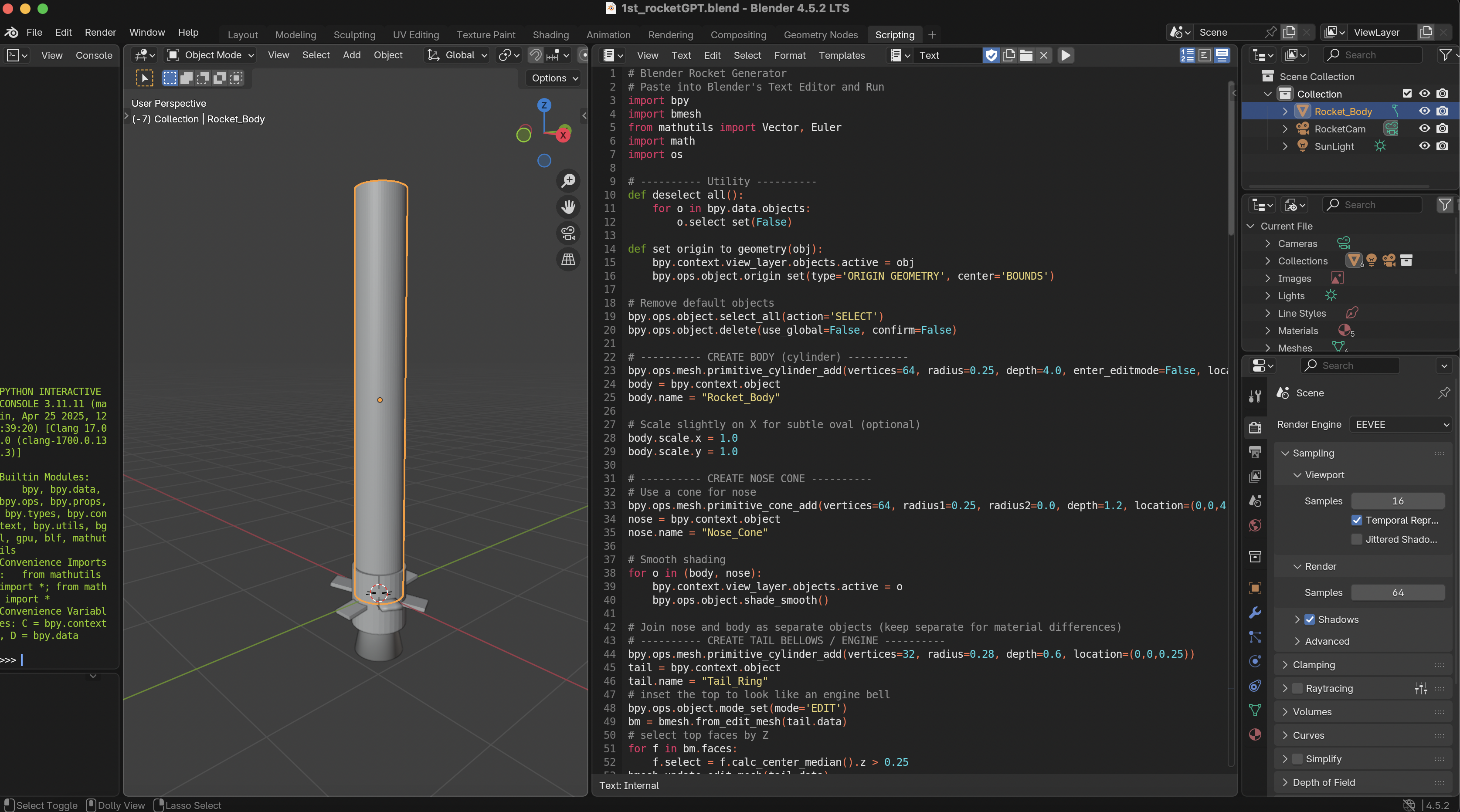
We can generate a 3D Blender Design of Simple Rocket with rather Unique Fin using ChatGPT and Blender Scripting Feature
# Blender Rocket Generator
# Paste into Blender's Text Editor and Run
import bpy
import bmesh
from mathutils import Vector, Euler
import math
import os

# ---------- Utility ----------
def deselect_all():
    for o in bpy.data.objects:
        o.select_set(False)

def set_origin_to_geometry(obj):
    bpy.context.view_layer.objects.active = obj
    bpy.ops.object.origin_set(type='ORIGIN_GEOMETRY', center='BOUNDS')

# Remove default objects
bpy.ops.object.select_all(action='SELECT')
bpy.ops.object.delete(use_global=False, confirm=False)

# ---------- CREATE BODY (cylinder) ----------
bpy.ops.mesh.primitive_cylinder_add(vertices=64, radius=0.25, depth=4.0, enter_editmode=False, location=(0,0,2.0))
body = bpy.context.object
body.name = "Rocket_Body"

# Scale slightly on X for subtle oval (optional)
body.scale.x = 1.0
body.scale.y = 1.0

# ---------- CREATE NOSE CONE ----------
# Use a cone for nose
bpy.ops.mesh.primitive_cone_add(vertices=64, radius1=0.25, radius2=0.0, depth=1.2, location=(0,0,4.6))
nose = bpy.context.object
nose.name = "Nose_Cone"

# Smooth shading
for o in (body, nose):
    bpy.context.view_layer.objects.active = o
    bpy.ops.object.shade_smooth()

# Join nose and body as separate objects (keep separate for material differences)
# ---------- CREATE TAIL BELLOWS / ENGINE ----------
bpy.ops.mesh.primitive_cylinder_add(vertices=32, radius=0.28, depth=0.6, location=(0,0,0.25))
tail = bpy.context.object
tail.name = "Tail_Ring"
# inset the top to look like an engine bell
bpy.ops.object.mode_set(mode='EDIT')
bm = bmesh.from_edit_mesh(tail.data)
# select top faces by Z
for f in bm.faces:
    f.select = f.calc_center_median().z > 0.25
bmesh.update_edit_mesh(tail.data)
bpy.ops.mesh.inset(thickness=0.03, depth=0.0)
bpy.ops.mesh.extrude_faces_move(TRANSFORM_OT_shrink_fatten={"value":-0.15})
bpy.ops.object.mode_set(mode='OBJECT')

# ---------- CREATE 3 FINS ----------
fin_objs = []
fin_count = 3
fin_height = 0.45
fin_length = 1.0
for i in range(fin_count):
    angle = (2*math.pi/fin_count) * i
    # create plane and extrude into a fin
    bpy.ops.mesh.primitive_plane_add(size=1, location=(0, 0.5, 0.7))
    fin = bpy.context.object
    fin.name = f"Fin_{i+1}"
    # edit to shape fin
    bpy.ops.object.mode_set(mode='EDIT')
    bm = bmesh.from_edit_mesh(fin.data)
    # scale and shape in edit mode
    bpy.ops.transform.resize(value=(0.2, fin_length, fin_height))
    bpy.ops.mesh.subdivide(number_cuts=2)
    bpy.ops.object.mode_set(mode='OBJECT')
    # rotate around body and position
    fin.rotation_euler = Euler((0.0, 0.0, angle), 'XYZ')
    # move outward from center
    vec = Vector((math.sin(angle)*0.35, math.cos(angle)*0.35, 0.0))
    fin.location += vec
    # rotate so fin tilts slightly down and back
    fin.rotation_euler.rotate_axis('X', math.radians(8))
    fin_objs.append(fin)

    # give each fin slight thickness
    bpy.context.view_layer.objects.active = fin
    bpy.ops.object.modifier_add(type='SOLIDIFY')
    fin.modifiers["Solidify"].thickness = 0.04
    bpy.ops.object.modifier_apply(modifier="Solidify")

# Smooth fins
for f in fin_objs:
    bpy.context.view_layer.objects.active = f
    bpy.ops.object.shade_smooth()

# ---------- UV Unwrap the body for logo mapping ----------
deselect_all()
body.select_set(True)
bpy.context.view_layer.objects.active = body
bpy.ops.object.mode_set(mode='EDIT')
# Smart UV Project for simple unwrap that is usable for painting/wrapping logos
bpy.ops.uv.smart_project(angle_limit=66, island_margin=0.02)
bpy.ops.object.mode_set(mode='OBJECT')

# ---------- Create Materials ----------
# Body material (with image texture slot named 'logo.png' - user can replace)
mat_body = bpy.data.materials.new(name="Body_Mat")
mat_body.use_nodes = True
nodes = mat_body.node_tree.nodes
links = mat_body.node_tree.links

# Clear default nodes
for n in nodes:
    nodes.remove(n)

# Create nodes
node_output = nodes.new(type='ShaderNodeOutputMaterial')
node_principled = nodes.new(type='ShaderNodeBsdfPrincipled')
node_tex = nodes.new(type='ShaderNodeTexImage')
node_uv = nodes.new(type='ShaderNodeTexCoord')
node_mapping = nodes.new(type='ShaderNodeMapping')

node_principled.inputs['Roughness'].default_value = 0.25
node_principled.inputs['Metallic'].default_value = 0.08

# Try to load logo image from same directory as current blend; user can swap name
logo_filename = "logo.png"
blend_dir = bpy.path.abspath("//")
logo_path = os.path.join(blend_dir, logo_filename)
if os.path.exists(logo_path):
    node_tex.image = bpy.data.images.load(logo_path)
else:
    # If logo not found, create a checker image so the material still shows
    # leave node_tex.image empty — user will see default color and can fill later
    pass

# Link nodes
links.new(node_tex.outputs['Color'], node_principled.inputs['Base Color'])
links.new(node_principled.outputs['BSDF'], node_output.inputs['Surface'])
links.new(node_uv.outputs['UV'], node_mapping.inputs['Vector'])
links.new(node_mapping.outputs['Vector'], node_tex.inputs['Vector'])

# Assign material to body
if body.data.materials:
    body.data.materials[0] = mat_body
else:
    body.data.materials.append(mat_body)

# Nose material (slightly different)
mat_nose = bpy.data.materials.new(name="Nose_Mat")
mat_nose.use_nodes = True
nodes_n = mat_nose.node_tree.nodes
nodes_n["Principled BSDF"].inputs['Base Color'].default_value = (0.9, 0.2, 0.12, 1)  # red-ish
nodes_n["Principled BSDF"].inputs['Roughness'].default_value = 0.2
nose.data.materials.append(mat_nose)

# Tail material
mat_tail = bpy.data.materials.new(name="Tail_Mat")
mat_tail.use_nodes = True
mat_tail.node_tree.nodes["Principled BSDF"].inputs['Base Color'].default_value = (0.03, 0.03, 0.03, 1)
tail.data.materials.append(mat_tail)

# Fins material
mat_fin = bpy.data.materials.new(name="Fin_Mat")
mat_fin.use_nodes = True
mat_fin.node_tree.nodes["Principled BSDF"].inputs['Base Color'].default_value = (0.12, 0.12, 0.12, 1)
for f in fin_objs:
    f.data.materials.append(mat_fin)

# ---------- Grouping & Origin ----------
deselect_all()
for o in (body, nose, tail) + tuple(fin_objs):
    o.select_set(True)
bpy.context.view_layer.objects.active = body
# Parent parts to body
for o in (nose, tail) + tuple(fin_objs):
    o.parent = body

set_origin_to_geometry(body)

# ---------- Simple camera and light ----------
# Camera
cam_data = bpy.data.cameras.new("RocketCam")
cam = bpy.data.objects.new("RocketCam", cam_data)
bpy.context.collection.objects.link(cam)
cam.location = (6.0, -6.0, 3.0)
cam.rotation_euler = Euler((math.radians(65), 0, math.radians(45)), 'XYZ')
bpy.context.scene.camera = cam

# Light
light_data = bpy.data.lights.new(name="SunLight", type='SUN')
light = bpy.data.objects.new("SunLight", light_data)
bpy.context.collection.objects.link(light)
light.location = (6, -6, 6)
light.data.energy = 4.0

# ---------- Final tweaks ----------
# Move whole rocket so base sits on Z=0
bbox_min_z = min((v.co.z for v in body.data.vertices))
if bbox_min_z < 0:
    bpy.ops.object.location_clear()  # just to ensure consistent context
# Select body and translate so bottom is z=0
deselect_all()
body.select_set(True)
bpy.context.view_layer.objects.active = body
minz = min((v.co.z for v in body.data.vertices))
bpy.ops.transform.translate(value=(0,0,-minz))

print("Rocket generation complete.")
print("If you want a logo: save this blend in same folder and add 'logo.png' there, then reload image node or set image in material nodes.")